GuidelinesOther guideline
Photography in Clinical Practice - Summary
Photography in clinical practice
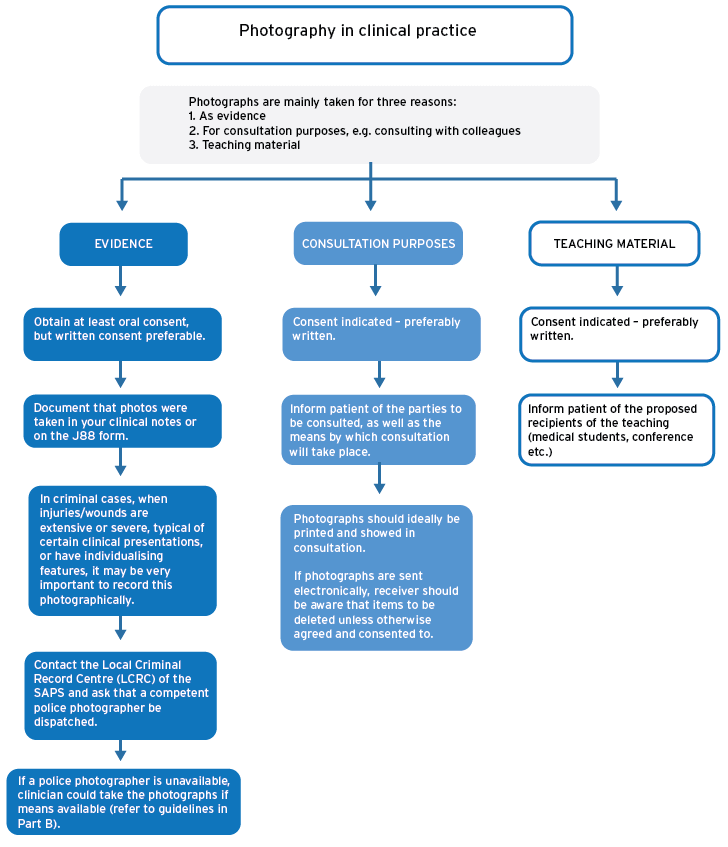
Advice for examiners
- Photographs are “visual evidence” and therefore need to conform to the principles of maintenance of the chain of evidence.
- The process of safekeeping, transporting, downloading, printing and saving the files should be streamlined and conform to the confidentiality agreements that are standard in health care practice.
- Document in your clinical notes or on the J88 form if photos are taken, describe or add the type of consent obtained, and indicate that photos will be stored on a password-protected computer.
- In criminal cases, when injuries/wounds are extensive or severe, typical of certain clinical presentations (e.g. physical child abuse), or have individualising features, it is very important to record this photographically:
- Contact the Local Criminal Record Centre (LCRC) of the SAPS and ask that a competent police photographer be dispatched.
- If a police photographer is unavailable, and the clinician is taking the photograph, use the following guidelines:
- Ensure proper identification or marking of the photograph (E.g. Patient name, date)
- Use a ruler/other measuring device (placed next to the wound, to give an idea of the size of the wound)
- Take close-up photos of wounds (e.g. bruises, lacerations, abrasions, etc)
- Take mid-range photos of the injuries in relation to the patient’s body
- Take care with regards to custody of the photographs
- Note in report and J88 that photographs were taken
- Photographs should as far as possible be taken with a good camera:
- A resolution of 8 MP (with the camera set at its highest resolution) should be the bare minimum.
- Take the photograph at a perpendicular (90 degree) angle to the surface.
- Be very careful when using a cell phone to capture photographs.
- If you do, install applications or software that will “lock” the photo albums and password protect it.
- Do not use a cell phone if you are not perfectly comfortable to download images completely and safely to your computer.